
2026-09-18
So, after the very unimpressive "window with a text" post I come with something a bit better: buttons and a text input.
I considered using a library for the user interface, but they were all either very bulky or weren't very customizable beyond some colors, so I decided to just create the components myself.
How hard could it be?
Since I was already able to draw text, I decided to go first with the text button, I was surprised to see that it didn't require that much work: init some variables, make a set position function that allowed a pivot point, make an "update" function that checked for the left mouse click, and make a draw function that painted a 9 tile grid depending on normal, hover, and pressed.
When using the button however, was when I got pleasantly surprised: I didn't need no fancy layout system, I knew beforehand how everything will be placed, so I just did, not only that but I also knew when I wanted to know if there was a click or not, so instead of a complex event system, I just placed an if.
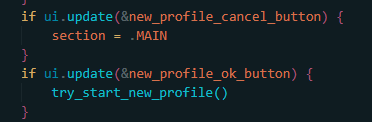
Next came the image buttons, these were predictably easier: instead of a 9 grid I just painted the image.
Finally, the text input, this one was a bit more complicated, one tends to take for granted how many functionalities a text input has, so when I noticed I was spending too much time tinkering it I decided to just leave all the rest for later, after all, it worked more than enough for its purpose: let the player write their name.
After that I created the profile system, which was basically writing and reading folders and files.
And with that I now have profile creation.
Copy this link to share it.
https://camus.lat/en/50/dev_blog/creating_profiles


